Websites
Task 1 - What is DNS
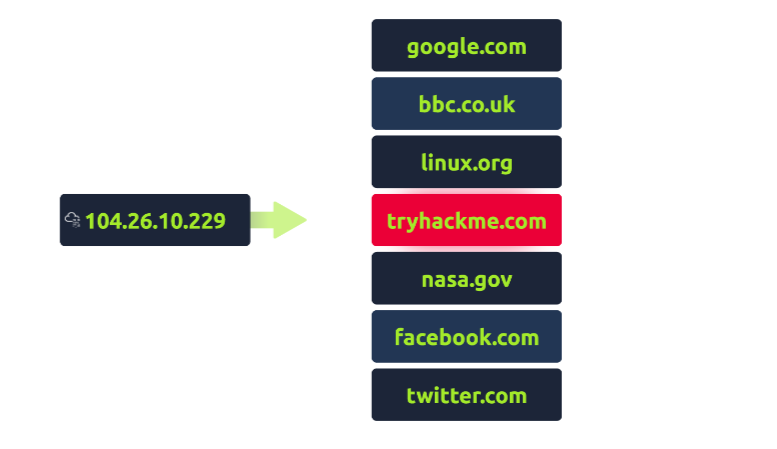
DNS (Domain Name System) is a system that translates human-readable domain names (like www.example.com) into numerical IP addresses that computers use to identify each other on the internet.”
Question
What does DNS stand for?
Click to see Answer
Domain Name System
Task 2 Domain Hierarchy
There are three Domain Hierarchy :
- TLD (Top-level Domain)
- Second-Level Domain
- Subdomain
Lets break this down using the website “Tryhackme.com”
TLD (Top-level Domain) Is on the far right part of the website in this case its “.com”
Top-Level Domain (TLD) A Top-Level Domain (TLD) is the rightmost part of a domain name. For instance, in the domain name tryhackme.com, the TLD is .com. TLDs are categorized into two types:
Generic Top-Level Domains (gTLD): These are intended to indicate the domain’s purpose. Examples include:
.com for commercial entities .org for organizations .edu for educational institutions .gov for government entities Country Code Top-Level Domains (ccTLD): These represent specific countries or regions, such as:
.ca for Canada .co.uk for the United Kingdom Due to increasing demand, many new gTLDs have emerged, including .online, .club, and .website, among others. A comprehensive list of over 2,000 TLDs is available online.
Second-Level Domain In the example tryhackme.com, the second-level domain is Tryhackme, which sits to the left of the TLD (.com). When registering a domain name, the second-level domain can be up to 63 characters long and may include letters (a-z), numbers (0-9), and hyphens. However, it cannot start or end with a hyphen or contain consecutive hyphens.
Subdomain A subdomain appears to the left of the second-level domain and is separated by a period. For example, in admin.tryhackme.com, admin is the subdomain. Similar to second-level domains, subdomains are also restricted to 63 characters and can only use letters (a-z), numbers (0-9), and hyphens. They cannot start or end with a hyphen(-) or have consecutive hyphens. Multiple subdomains can be created, resulting in longer names like jupiter.servers.tryhackme.com, but the total length of the domain name must not exceed 253 characters. There is no limit to the number of subdomains you can create for your domain.
Questions
What is the maximum length of a subdomain?
Click to see Answer
63
Questions
Which of the following characters cannot be used in a subdomain ( 3 b _ - )?
Click to see Answer
_
Questions
What is the maximum length of a domain name?
Click to see Answer
253Task 3 - Record Types
DNS isn’t just about websites; it also includes various types of records that help direct internet traffic. Here are some of the most common DNS record types you might encounter:
A Record An A Record connects a domain name to an IPv4 address, which is a series of numbers that identifies a server on the internet. For example, if you type in example.com, the A Record might point to an address like 104.26.10.229.
AAAA Record Similar to an A Record, an AAAA Record connects a domain name to an IPv6 address, which is a newer format of IP address that allows for more unique addresses. An example would be 2606:4700:20::681a .
CNAME Record A CNAME Record allows one domain name to point to another domain name instead of an IP address. For instance, store.tryhackme.com might use a CNAME record to point to shops.shopify.com. This means that when someone tries to access the store, their computer first checks the CNAME and then finds out the IP address for shops.shopify.com.
MX Record MX Records are used for email. They tell email servers where to send messages for a specific domain. For example, if someone sends an email to example@tryhackme.com, the MX Record will point to an address like alt1.aspmx.l.google.com. These records also have a priority level, indicating which server to try first. This is useful if the main server isn’t available, as it helps ensure emails are still delivered.
TXT Record TXT Records can hold any text data. They are versatile and used for various purposes, such as verifying that a domain owner is who they say they are or specifying which servers are allowed to send emails on behalf of the domain. This helps combat spam and email spoofing.
Questions
What type of record would be used to advise where to send email?
Click to see Answer
MX
Questions
What type of record handles IPv6 addresses?
Click to see Answer
AAAATask 4 - Making a request
-
Your Computer Checks Local Cache: When you type a web address (like www.tryhackme.com) into your browser, your computer first looks in its own memory (local cache) to see if it already knows the IP address for that website.
-
Request to Recursive DNS Server: If your computer doesn’t find the address in its local cache, it sends a request to a Recursive DNS Server (usually provided by your ISP).
-
Recursive DNS Server Checks Its Cache: The Recursive DNS Server also checks its cache to see if it has the answer. If it finds it, it sends the IP address back to your computer.
-
Journey to Find the IP Address: If the Recursive DNS Server doesn’t have the answer, it contacts the Root DNS Server.
-
Root DNS Server:The Root DNS Server knows where to find the Top Level Domain (TLD) servers and sees that you’re looking for a .com address, so it sends your request to the appropriate TLD server for .com domains.
-
TLD Server: The TLD server directs the request to the Authoritative DNS Server for www.tryhackme.com, which knows the actual IP address of the website.
-
Authoritative DNS Server: The Authoritative DNS Server sends the IP address back to the Recursive DNS Server Its responsible for storing the DNS records for a particular domain name .
-
Response Back to Your Computer: The Recursive DNS Server caches this IP address for future requests and sends it back to your computer.
-
Caching: Each time a DNS record is returned, it comes with a TTL (Time To Live) field, telling your computer how long to keep that information before needing to look it up again.
Questions
What field specifies how long a DNS record should be cached for?
Click to see Answer
AAAA
Questions
What type of DNS Server is usually provided by your ISP?
Click to see Answer
AAAA
Questions
What type of server holds all the records for a domain?
Click to see Answer
AAAATask 5 - Practical
Using the website on the right, we can build requests to make DNS queries and view the results. The website will also show you the command you’d need to run on your own computer if you wished to make the requests yourself.
Questions
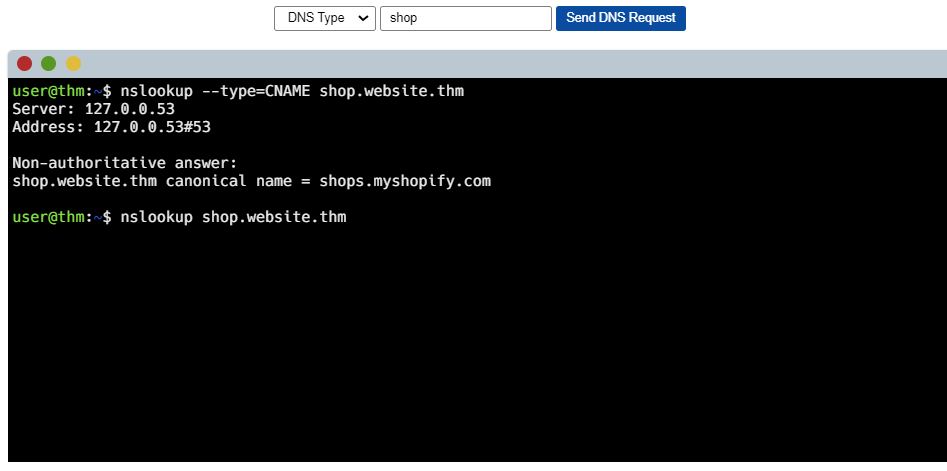
What is the CNAME of shop.website.thm?
TO solve this we simply identify the subdomain of the website shops.myshopify.com find the subdomain in the image below
Click to see Answer
shops.myshopify.com
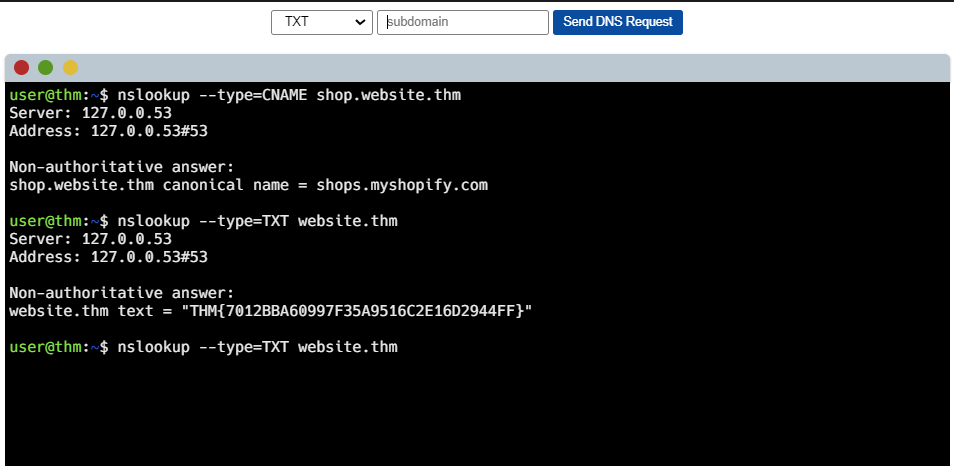
Questions What is the value of the TXT record of website.thm?(HINT:No subdomain is needed in the terminal.)
Rember the termainl already has a website it’s inspecting therefore the only thing we have to do find the txt record is to change the record type as shown below in the 2nd terminal session
Click to see Answer
THM{7012BBA60997F35A9516C2E16D2944FF}
Questions
What is the numerical priority value for the MX record?
Same scenario here, we just have change the record type to MX In the 2nd terminal session

Click to see Answer
30
Questions
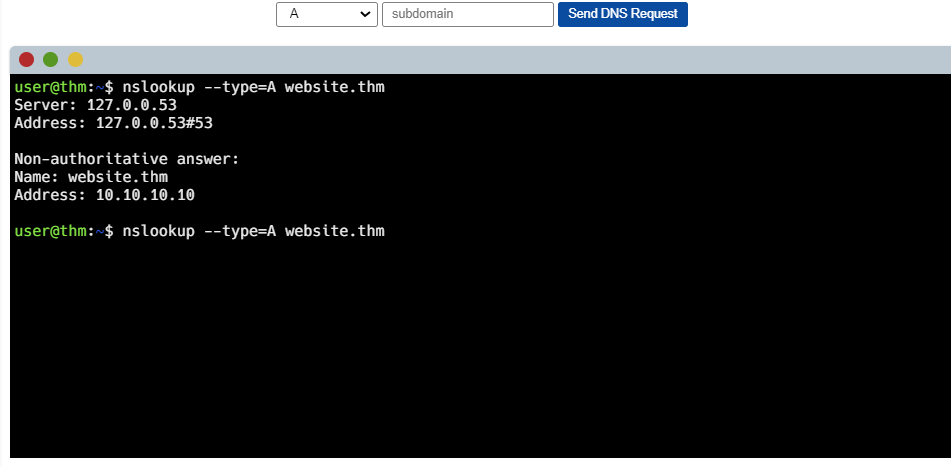
What is the IP address for the A record of www.website.thm?
Yup its the same here too.
Click to see Answer
10.10.10.10That’s this room done we can proceed to HTTP in detail